

This guide explains how to connect Bitbucket Data Center to an OpenHands Enterprise Replicated installation. The integration lets users sign in with Bitbucket Data Center, open repositories, and invoke OpenHands from pull request comments.Documentation Index
Fetch the complete documentation index at: https://allhandsai-alona-enterprise-data-center-docs.mintlify.app/llms.txt
Use this file to discover all available pages before exploring further.
Prerequisites
- A Bitbucket Data Center administrator who can create an OAuth 2.0 Application Link.
- Repository administrator access for users who will install repository webhooks from OpenHands.
- Network access from OpenHands to Bitbucket Data Center for API calls, and from Bitbucket Data Center back to the OpenHands app URL for webhook delivery.
- If Bitbucket Data Center uses an internal or self-signed certificate, upload the issuing CA in the OpenHands Enterprise Admin Console under Additional Trusted CA Certificates before deploying.
Create a Bitbucket OAuth Application Link
In Bitbucket Data Center, create an OAuth 2.0 Application Link for OpenHands. The exact menu labels can vary by Bitbucket version, but this is usually under Administration > Application Links.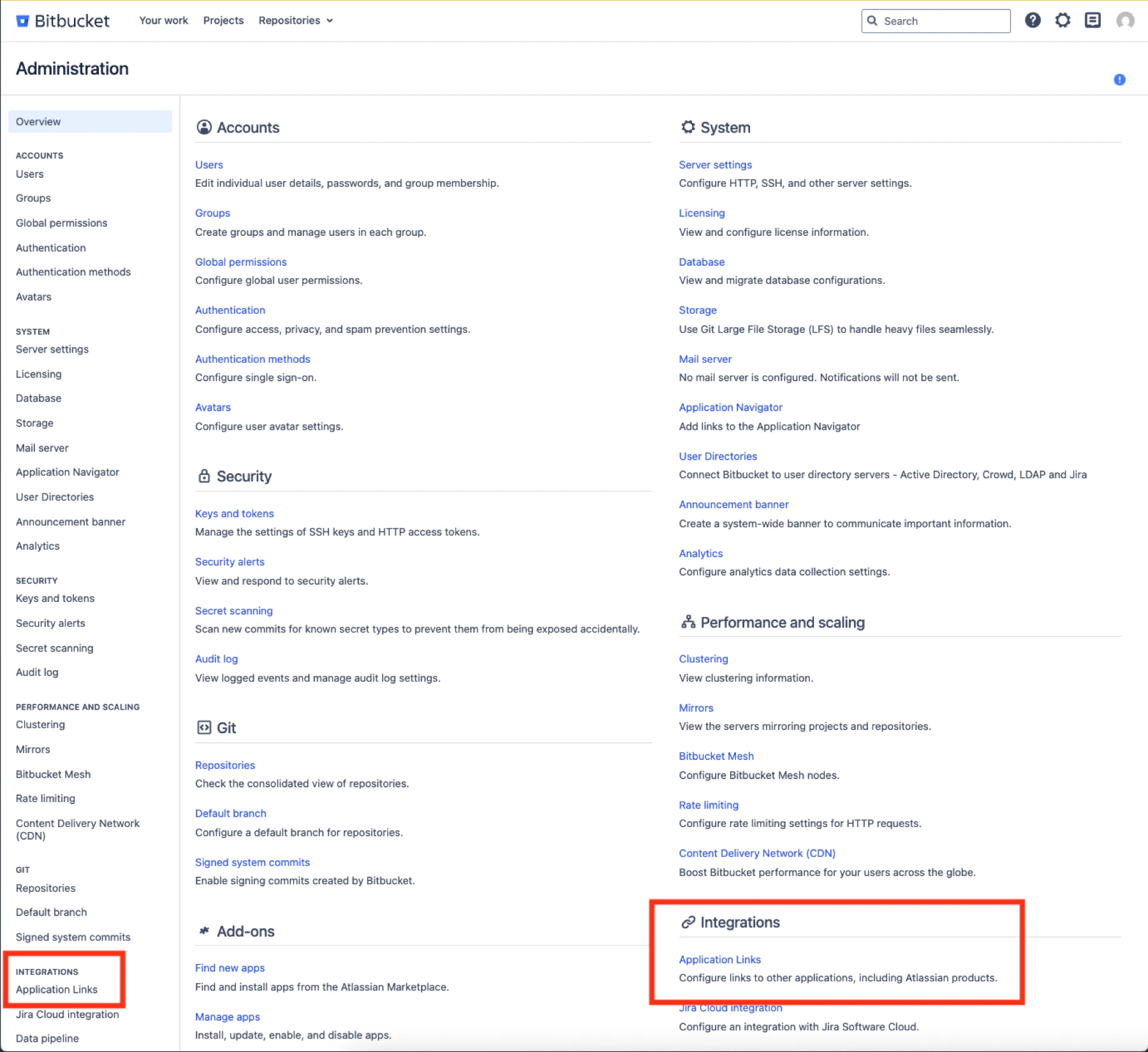
REPO_ADMIN OAuth scope so it can list repositories and
install or refresh repository webhooks from the OpenHands UI. Copy the client ID
and client secret. You will paste them into the OpenHands Enterprise Admin
Console.
REPO_ADMIN is required so OpenHands can list repositories in the UI and
create or refresh the OpenHands Resolver repository webhook. OpenHands does
not perform other repository administration actions.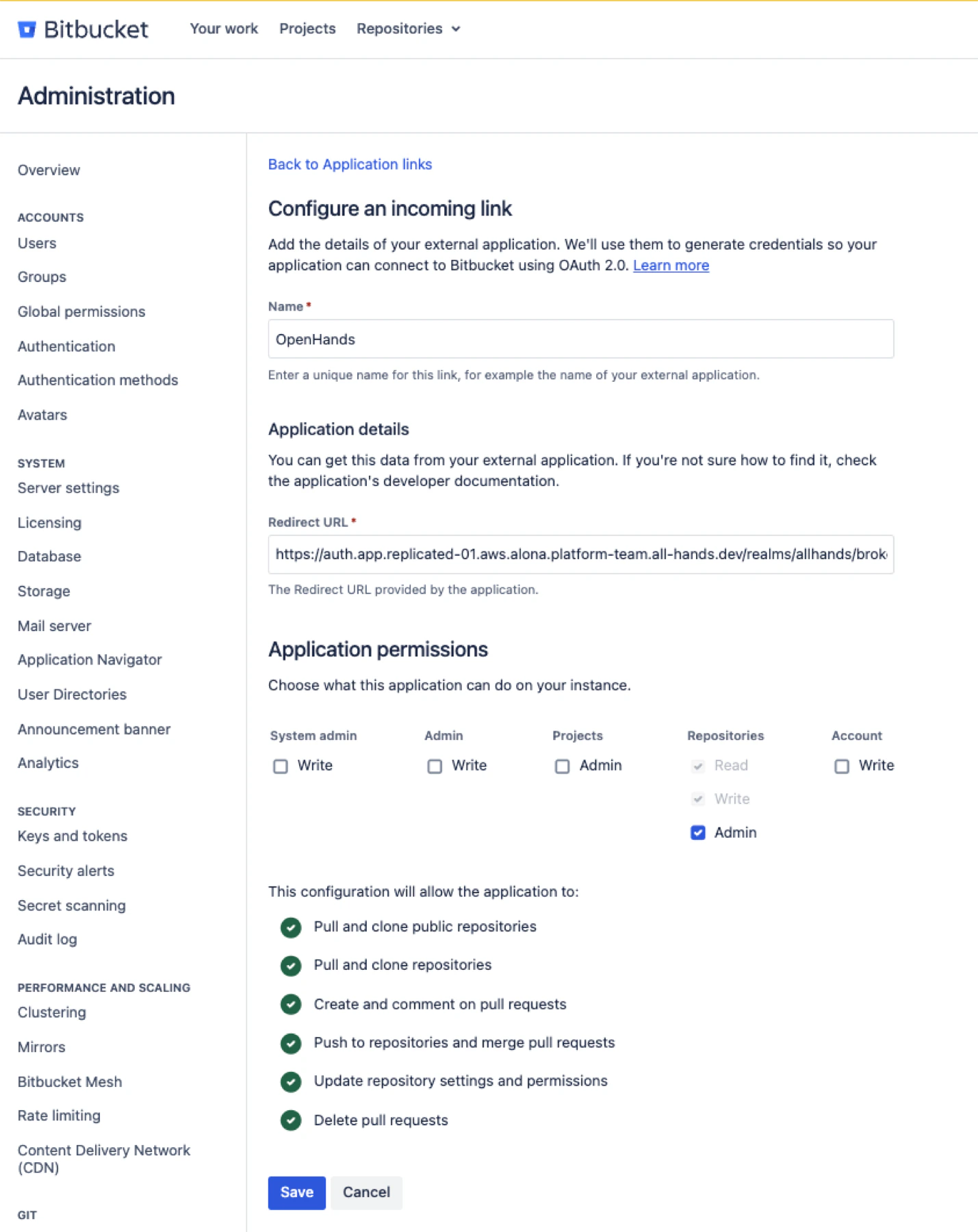
Create a Bot Token
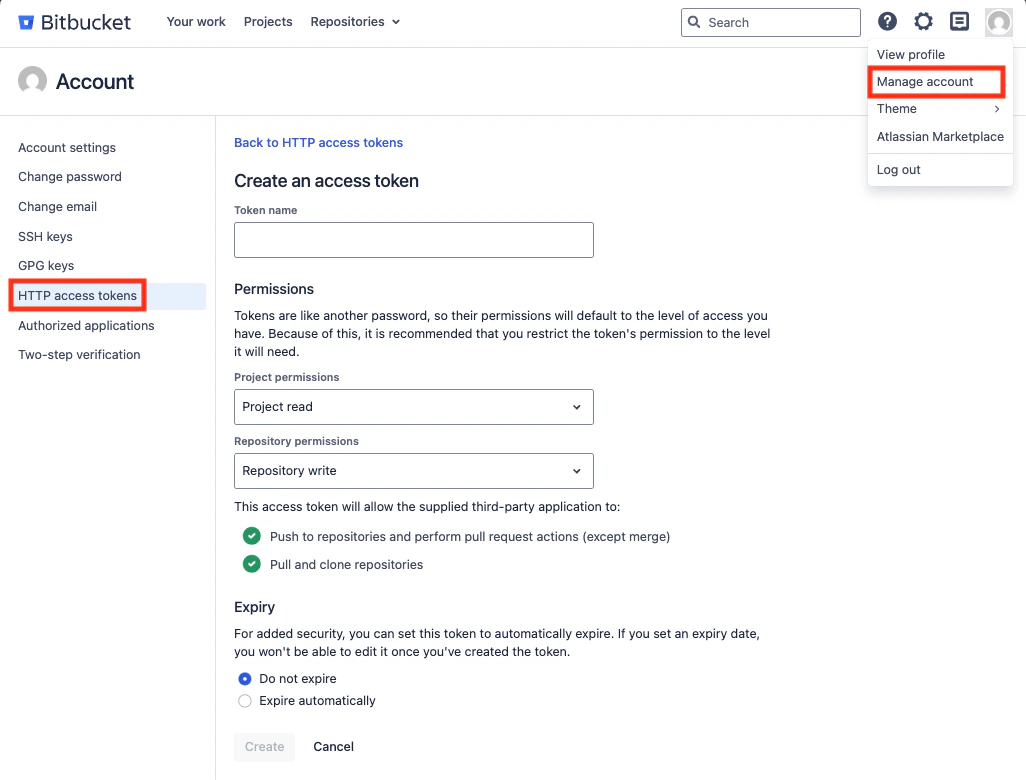
This step is strongly recommended but technically optional. When a bot token is configured, OpenHands posts comments and reactions as the bot account instead of as the user. Create a dedicated Bitbucket Data Center user for OpenHands. For example, create a user namedopenhands with an email address such as
openhands-bot@company.com. Grant this user access to all repositories where
OpenHands should post comments or reactions. Then create an HTTP access token
for that user with Repository permissions set to Repository write. Store
the token securely. You will need to paste the PAT into the OpenHands Enterprise
Admin Console.
Configure the Admin Console
Open the Replicated Admin Console for your OpenHands Enterprise installation and go to the application configuration page. In Bitbucket Data Center Authentication:- Enable Bitbucket Data Center Authentication.
- Enter the Bitbucket Data Center Domain.
- Enter the Bitbucket Data Center Client ID.
- Enter the Bitbucket Data Center Client Secret.
- Enter the Bitbucket Data Center Bot Token if you have one.
- Save and deploy the updated configuration.
Sign In with Bitbucket Data Center
After the deployment is completed, users choose Sign in with Bitbucket Data Center on your app’s login page. On first sign-in, users may be asked to accept OpenHands terms and complete an offline access flow. After sign-in, OpenHands stores the user’s Bitbucket Data Center token so it can list repositories and run resolver jobs as that user.Install Repository Webhooks
To trigger OpenHands on Bitbucket repositories, repository administrators can install the OpenHands bot onto a repository from Settings > Integrations within the OpenHands app. For each repository that should support@openhands
pull request comments, click Install. If a webhook already exists, click
Reinstall to refresh it.
OpenHands creates or updates a repository webhook named OpenHands Resolver.
The webhook URL is connection-specific:
Trigger OpenHands from Bitbucket Data Center
Open a pull request and add a comment containing@openhands. Inline pull
request comments are also supported.
OpenHands starts a resolver job when:
- The repository webhook is installed and active.
- The webhook delivery signature is valid.
- The mentioning Bitbucket user has signed in to OpenHands with Bitbucket Data Center.
- The mentioning user has access to the repository.
Troubleshooting
| Symptom | Check |
|---|---|
| The Bitbucket Data Center login option is not visible | Confirm Bitbucket Data Center Authentication is enabled in the Admin Console and the deployment has been applied. |
| OAuth redirects fail | Confirm the callback URL exactly matches https://auth.app.<your-openhands-domain>/realms/allhands/broker/bitbucket_data_center/endpoint. |
Login tries to reach an invalid https://https://... URL | Remove https:// from the Bitbucket Data Center Domain field in the Admin Console. |
| Repository webhook install fails | Confirm the user has repository admin access and the OAuth app grants REPO_ADMIN. |
| Webhook delivery reaches OpenHands but no job starts | Confirm the comment contains @openhands, the webhook is installed for that repository, and the mentioning Bitbucket user has signed in to OpenHands. |
| OpenHands cannot list Bitbucket repositories or install webhooks | Confirm the OpenHands cluster can reach the Bitbucket Data Center URL. |
| Bitbucket webhook deliveries do not reach OpenHands | Confirm the Bitbucket Data Center network can reach the OpenHands app URL. |
| Bitbucket API calls fail with TLS errors | Upload the Bitbucket Data Center CA certificate in Additional Trusted CA Certificates and redeploy. |